
ORIGINAL EMAIL · ILLUSTRATIVE
STOP CHASING. START FETCHING.
Follow up automatically.
Stop when they reply.
The proposal, document or decision you’re waiting for. FetchHound sends the follow-ups you’ve approved, from your own mailbox, so you can get on with your day.
Free beta · No card · No mandatory demo
YOUR FOLLOW-UP, HANDLED.Illustrative example
WAITING ON
Quote Q-1042
Joe Taylor · Proposal decision
- ✓Original quote sentYou already sent the original quote.
- ↗Your approved follow-upScheduled for Thursday, 10:30.
- ↩Joe replies. Chase pauses.You decide the next step.
Remaining emails on holdExplore it

For the conversations already in motion.CONSULTANTS / AGENCIES / CLIENT OPERATIONS
THE PART AFTER “SEND”
Good work shouldn’t live
on your mental list.
You’ve sent the proposal. Asked for the documents. Requested a decision.
Then comes the remembering, the checking and another “just following up”. FetchHound gives that waiting a plan.
Your words. Your timing. One less thing to chase.
A FETCH, FROM START TO REPLY
See the chase.
Then see it stop.
Explore a real workflow with fictional data.
Simulated demo. No emails are sent.
FETCH TIMELINE
Waiting for a replyQuote Q-1042
A reply changes the plan.
Create your first Fetch ↗The remaining emails are held. This is a reply to review, not a confirmed sale.
SIMPLE BY DESIGN
Set the plan.
Get your headspace back.
One focused workflow alongside your inbox.
No replacement CRM. No new place to read your mail.
Connect your email.
Use your authorised Gmail or compatible SMTP/IMAP mailbox. Account sign-in and mailbox authorisation are separate.
Create and approve.
Tell Chase what you need, add the people and review every message and scheduled time. Quick Fetch keeps it together.
Let the plan run.
Your approved emails send on schedule. A detected reply holds the rest. Pause, cancel or take over whenever needed.
REAL WORK. SMALL NUDGES.
For the answers
work depends on.
The proposal that needs a decision.
A reviewed sequence keeps the conversation moving without another reminder on your own to-do list.
Quotes & proposals ↗The approval holding the project up.
Give client decisions a clear next step. Add the reference and an optional time to talk, in your own voice.
Explore an approval Fetch ↗The documents you still need.
Follow up with the right people, attach supporting files and stop the sequence when someone responds.
Documents & approvals ↗THE PRODUCT YOU’LL ACTUALLY USE
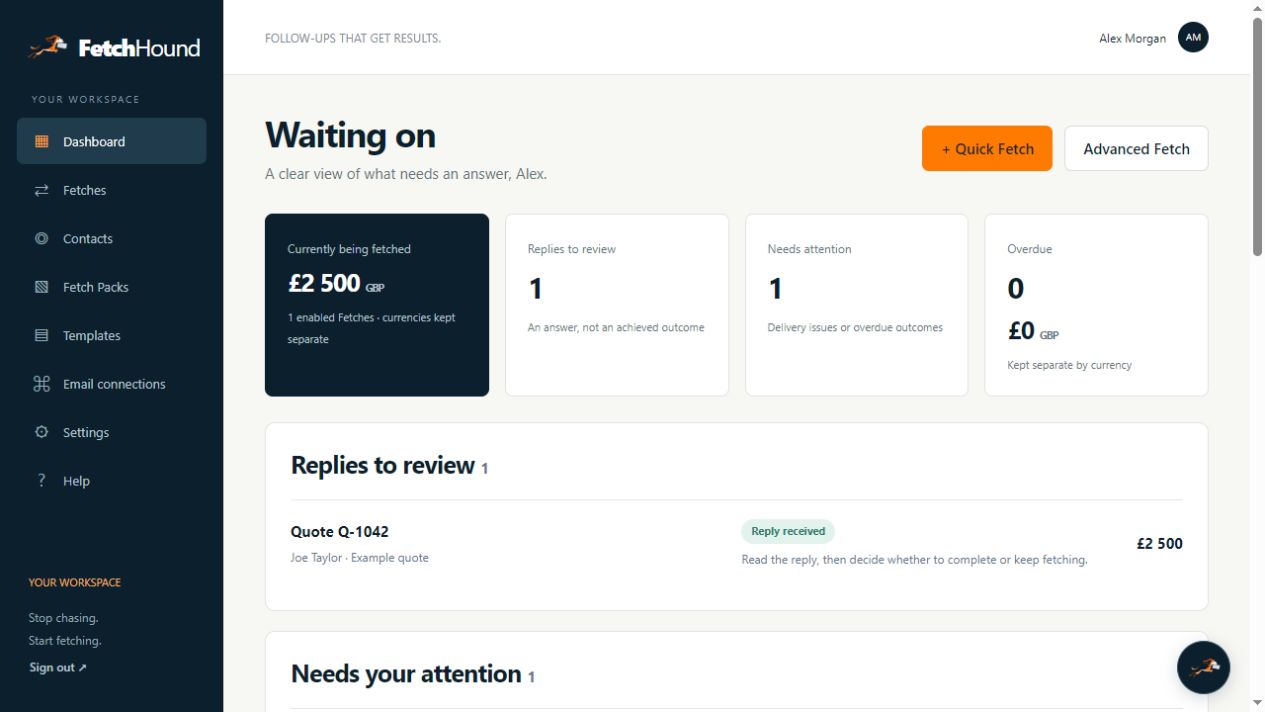
A clear home for
everything you’re waiting on.
Current interface, fictional workspace.
Choose a view to see it at a useful size.
YOU STAY IN CONTROL
Persistent.
Polite.
Approved by you.
Automation should make the plan easier to follow, not take the decisions away.
Your mailbox. Your message.
Customer follow-ups go through the mailbox you authorise. FetchHound system emails are separate.
Review before anything sends.
Check To and CC recipients, the exact copy, attachments and timing. A saved Fetch can stay ready until you approve sending.
Pause on a reply. Hold on uncertainty.
Replies from a To or CC recipient hold future messages. Unsafe mailbox checks and uncertain sends require your review.
Your outcome is yours to record.
A reply may be a question, a delay or a decision. Read it in your mailbox, then choose Mark complete or Keep fetching.
What exactly does FetchHound do?
It schedules the follow-up emails you review and approve, sends them through your connected mailbox and holds the remaining messages when a relevant recipient reply is detected.
Is this for cold email campaigns?
FetchHound is for legitimate business conversations you are already having: proposals, documents and decisions. It is not a bulk outreach platform.
Do I have to connect my email straight away?
You can create and save a Fetch first. Connect a healthy mailbox before starting it. Customer follow-ups always come from your connected account.
Can I use Gmail or another email provider?
Gmail is supported. Other providers must support both SMTP and IMAP over TLS and pass the connection check. Microsoft onboarding is awaiting full mailbox verification and is not advertised as generally available in this beta.
What permissions do you need?
Gmail uses OAuth to authorise approved sending and checks for replies. Other email requires your provider’s SMTP/IMAP credentials, sometimes an app password. Account sign-in and mailbox connection are separate.
Can I approve the emails first?
Yes. Check the recipients, subjects, bodies, attachments and schedule before explicitly enabling sending. Every message is editable.
What happens when someone replies?
A detected reply from any To or CC recipient holds the remaining follow-ups. You decide whether to mark the outcome complete or keep fetching. A reply does not mean a proposal was accepted.
Can I stop or change a Fetch?
You can pause or cancel it. A message already being sent may cross with a reply in transit. Uncertain sends are held for review rather than blindly retried.
Can I include a booking link or documents?
Yes. Booking links are optional and editable. Attach up to five supported files with a combined allowance of 5 MB, subject to the connected provider’s safe send limit.
Is my mailbox secure?
Connections use OAuth or TLS, and stored mailbox credentials are encrypted in private server storage. No service can promise absolute security. Review our privacy information before authorising access.
Is it free, and do I need a credit card?
The current beta is free and does not collect cards. A future 14-day cardless trial and subscriptions are being prepared; trial expiry and payment collection are not active.
Do I need a demo or sales call?
No. Explore the simulated demo here, sign up and use Quick Fetch. If you would like help, contact support@fetchhound.co.
How long does setup take?
You choose the mailbox, recipient, wording and timing. Quick Fetch keeps those decisions in one short flow. Provider approval can vary, so we do not promise a fixed setup time.
A LITTLE LESS CHASING.
Your next reply
deserves a plan.
Start with one conversation. Review the emails. Let Chase keep it moving.
Try FetchHound free ↗Free beta access · No card · No sales call
Stop chasing.Start fetching.